Scaling RAG: Building an Efficient Pipeline for 500k Chunks with Gemini 2.5 and Context Caching
RAG a escala: pipeline eficiente con 500k chunks, Gemini 2.5 y context caching
1. The Architecture
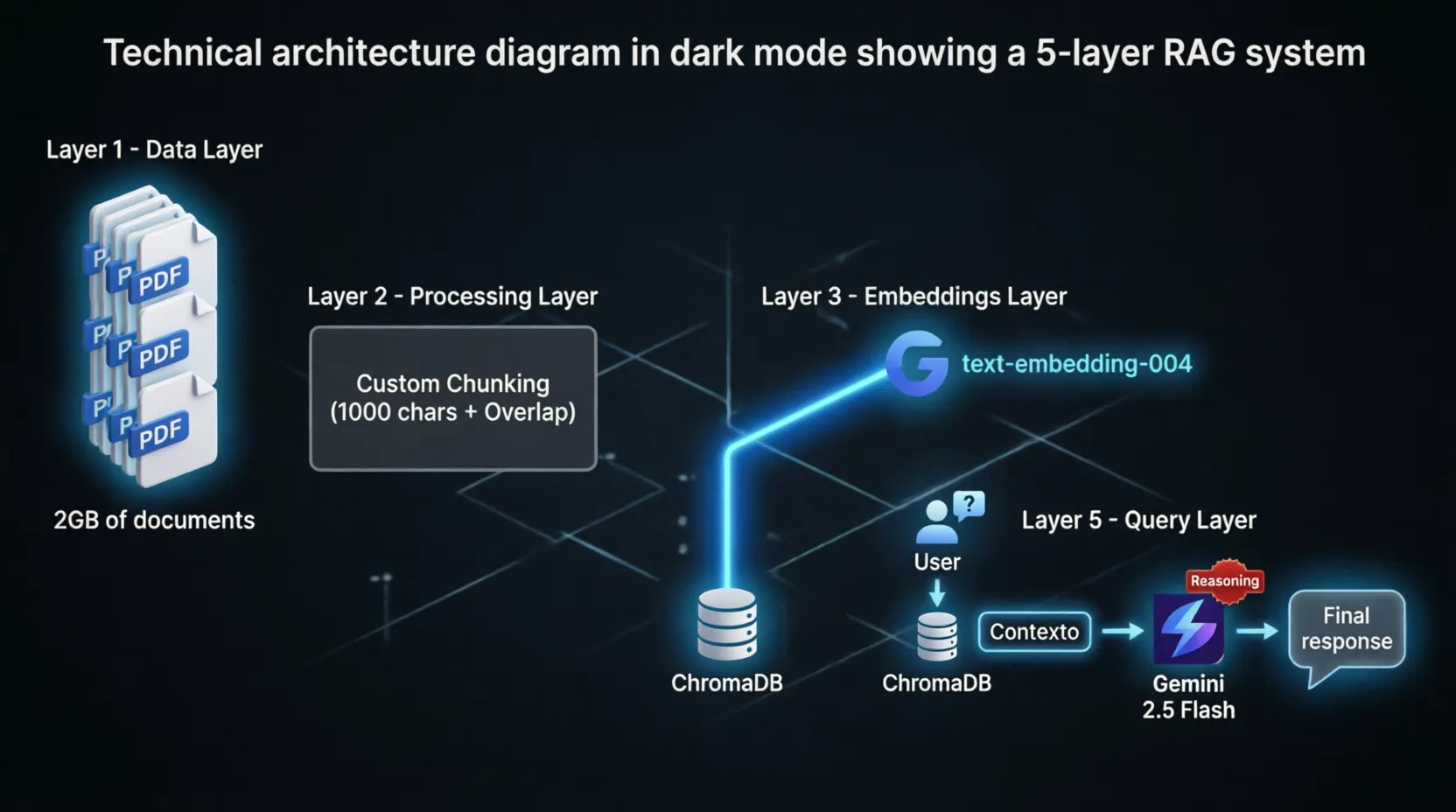
To process a volume of approximately 2GB (roughly 500,000 text chunks), we need a high-performance pipeline:
- Extraction: PDF processing using PyMuPDF (Fitz) for speed.
- Intelligent Chunking: Semantic splitting to avoid breaking words, including strategic overlap.
- Vectorization: Utilizing
text-embedding-004(orgemini-embedding-001). - Persistence: ChromaDB for vector storage and metadata management.
- Inference: Gemini 2.5 Flash, leveraging its native reasoning capabilities to filter noise.
2. Environment Setup
We will use the latest Google GenAI SDK. Install the dependencies:
pip install -q -U google-genai chromadb pymupdf
3. Smart Chunking: The Secret to Precision
Correctly segmenting text represents 80% of RAG success. This function ensures we don't cut words mid-sentence while maintaining a meaningful overlap.
def chunk_text(text, size=1000, overlap=200):
    chunks = []
    start = 0
    while start < len(text):
        end = min(start + size, len(text))

        if end < len(text):
            last_space = text.rfind(' ', start, end)
            if last_space != -1:
                end = last_space

        segment = text[start:end].strip()
        if segment:
            chunks.append(segment)

        start = end - overlap
        if start >= end: start = end + 1
        if end >= len(text): break
    return chunks
4. Extraction and ChromaDB Ingestion
We use PyMuPDF for its high performance when handling heavy technical manuals.
import fitz
import chromadb

db_client = chromadb.PersistentClient(path="./tech_docs_db")
collection = db_client.get_or_create_collection(
    name="technical_documentation",
    metadata={"hnsw:space": "cosine"}
)

def process_and_store_pdf(pdf_path):
    doc = fitz.open(pdf_path)
    for i, page in enumerate(doc):
        text = page.get_text()
        chunks = chunk_text(text)

        for j, chunk in enumerate(chunks):
            chunk_id = f"{pdf_path}_{i}_{j}"
            collection.add(
                documents=[chunk],
                ids=[chunk_id],
                metadatas=[{"source": pdf_path, "page": i}]
            )
5. Embeddings with the New SDK
Defining the vectorization logic using the latest embedding models:
from google import genai
from google.genai import types

client = genai.Client(api_key="YOUR_API_KEY")

def get_embedding(text):
    result = client.models.embed_content(
        model="text-embedding-004",
        contents=text,
        config=types.EmbedContentConfig(task_type="RETRIEVAL_QUERY")
    )
    return result.embeddings[0].values
6. Retrieval and Reasoning
Gemini 2.5 Flash can "reason" over retrieved fragments. This is crucial for resolving contradictions often found in technical documentation.
def generate_response(query):
    # 1. Vectorize query and search ChromaDB
    query_vector = get_embedding(query)
    results = collection.query(
        query_embeddings=[query_vector],
        n_results=5
    )

    context = "\n\n".join(results['documents'][0])

    # 2. Generate response with reasoning capabilities
    prompt = f"""Act as a Senior Systems Engineer. Analyze the context and answer the question.
    Use your reasoning capabilities to validate data points before responding.

    Context:
    {context}

    Question: {query}

    If the information is not present in the context, state it clearly. Do not hallucinate technical data."""

    response = client.models.generate_content(
        model="gemini-2.5-flash",
        contents=prompt
    )
    return response.text
7. Cost Optimization: Context Caching
If your 2GB documentation is static, sending the same tokens repeatedly is inefficient. Gemini 2.5 allows for Context Caching.
- How it works: Upload documents once to Google’s servers, creating a cache with a specific TTL (Time-To-Live). Your RAG queries then target this cache.
- The Benefit: Reduces input token costs by up to 80% in long, multi-turn conversations.
Conclusion
Implementing RAG at scale requires precision in chunking and a model capable of distinguishing signal from noise. Gemini 2.5 Flash, combined with ChromaDB, provides an enterprise-grade solution with minimal maintenance overhead.
References:
¿Cuánto pierdes al mes sin automatizar?
Usa la calculadora de ROI: te estima en segundos cuánto te devuelve automatizar soporte, data entry o WhatsApp con IA. Matemática honesta y salarios reales de LATAM.
Calcular mi ROI